

Welcome to the 2021 ILDA Cloud Conference!
-
How to set up, view and participate in the Conference
The Conference will use these four online methods to give everyone an optimum experience:
1. An online Zoom meeting so everyone can "be in the same room" for presentations, discussions, etc.
2. A high-definition streaming video viewer on this webpage so that everyone can see high-quality videos or laser shows. This gives much better video quality than Zoom can provide.
3. An optional discussion and tech help area using the Discord messaging system. This is similar to the "hanging out" that people do at an in-person conference, in the halls and at the bars outside of the formal meeting.
4. A voting system for the few times during the Conference when we need to take a vote.
Details on how to set up and use these are in the sections below:-
1: Zoom meeting
The main ILDA Cloud Conference stream will be using Zoom. The Zoom links to use for the Conference are below. Click the blue button "List of all events."
Note that there are four different Zoom links, for different parts of the Conference. This is because Zoom cannot do one very long meeting!
We have color-coded the events, on the at-a-glance schedule and also on the list of events on this page. This will help you find the right Zoom link for each part of the Conference.For persons new to Zoom
If you have not used Zoom before, we suggest you try it out with a friend or colleague. Zoom is free, though you have to sign up and create the free account. (Zoom does try to get you to sign up for pay services; just skip those choices.)
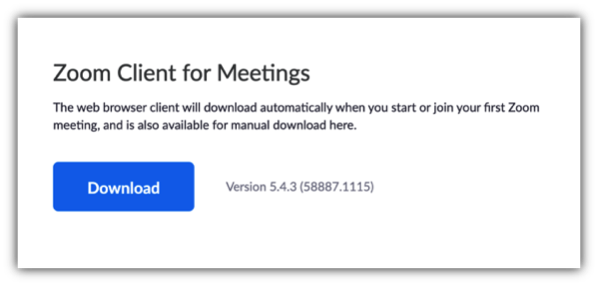
You must download a Zoom client program from the Zoom.us webpage. This Zoom program will run on your computer. (For our meeting, you cannot Zoom directly from a browser window. You must download the Zoom client for your operating system. A download screen is shown below so you know what to look for.)
Zooming is pretty simple but we cannot go into the basics here. There is a technical support session from 12 noon to 2 pm Eastern/NY on Friday Nov. 5. See below in the list of events for details. Use this session to check out that your Zoom is working and to ask any questions about the HD Stream and Discord.
-
2. HD Stream viewer
On this page is a high-resolution HD Stream video viewer. This will be used for times we need high-quality video, because Zoom compresses quality too much. Our technical wizards, Newlin Parker and Will Carder, are managing the HD Stream.
How to set up and view the HD Stream
To see the HD Stream you just click in the HD Stream viewer window below. A new browser tab will open with the Log in using the username and password we sent you by email on November 20, about 12 hours before the Conference's official start time.
When you first join the HD Stream, you'll be asked to pick a stream closest to you, and a video bandwidth appropriate for your situation. Do this. Then a video screen will open.
You can maximize the HD Stream window to full size if you wish, by using the 4-bracket icon in the lower right corner of the player window. Keep the video stream open to view content that will be played during the Zoom meeting. At times the HD Stream may be black or blank if there is no streaming content.
Note: Your HD Stream username is unique to you as a Conference registrant. Do not share it with others; if they use your username, they will block your usage.How to send from your computer to the HD Stream
If you want to present your own laser show(s) during the Lase-Off or the "ILDA After Dark" informal sessions, we can provide instructions for sending to the HD Stream. These instructions will be added later to this page.
-
3. Discord messaging (optional extra)
We have set up a Discord server just for ILDA. It can be used for official side discussions, technical help, and other talk that is not the main Zoom presentation. This is the online equivalent of stepping outside the main meeting area for a quick chat, or meeting at the bar for longer talks.
Discord works kind of like forum software, with various channels such as "#announcements" and "#visitors-artistic". At the "#choose-your-interests" section on the left side, you can join some of these channels.
Discord has a lot of power and options. Some registrants may find Discord confusing or intimidating. Don't worry —it is NOT necessary to use Discord to take part in the Conference. Though since the Conference is 57 hours long you might want to try checking it out at some point. How to set up and use Discord
Discord can be used in a web browser or as a standalone program. For use in a browser, simply go to the discord.com website and log in (you do need to create a free account the first time).
You can also download a program for your computer from the same website Just click the above link and you will see two choices (yours will have your operating system where it says "Download for Mac"):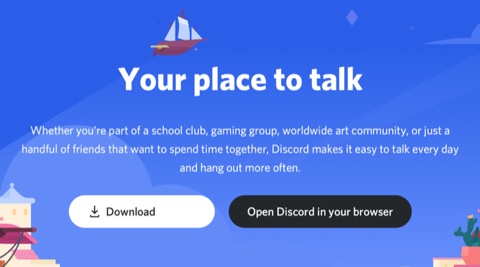
To go to ILDA's Discord server, use this link: https://discord.gg/SYsxrSQ. This is where all technical help will be handled. On the left side of the Discord window will be a channel list. One channel is called #community-conduct. Click that channel.
1. Once there, you will see ILDA's Discord code of conduct, with a green checkbox at the bottom. Check the box to accept the code of conduct.
2. Next, in the left pane, you'll see a channel called "#choose-your-interests". Go there and choose your interests. Make sure you choose "Conference" plus any others that interest you.
3. In the left panel, you should now be able to see a category called "Conference". Click to expand it, and then you'll see related channels: "#conference-info-2020" "#tech-help-2020-conference" underneath it. You can go to #conference-info-2020 to see up to the minute information about the conference. If you need help, go to #tech-help-2020-conference, and we'll be there to help you.
If you are completely and utterly lost, you can contact us, and we will lead you out of the woods and into the conference room.
Newlin Parker and Will Carder
2021 ILDA Cloud Conference Technical Coordinators -
4. OpaVote online voting
There will be at least one vote taken during the ILDA Cloud Conference — for the Laser Jockey contest. There also may be voting for Board and President elections, and for motions during the ILDA General Business meeting.
Voting will be done using a system called OpaVote; ILDA has used it before this year.
When the time comes to vote during an event, OpaVote will immediately send an email to all attendees who are eligible to vote in the election. The email will have a link and instructions.
When you get the email, click on it to go a web page where you make your ballot choices. Then, click the "Vote!" button to submit your vote. -
Tip: Use multiple monitors or devices
Your Cloud Conference setup will work best if you have two (or more!) screens and monitors. Put the HD Stream on your biggest display. Put the Zoom meeting on your smaller display. If you have a third — lucky you — use it for Discord and for regular windows like email, web surfing, Facebook, etc.
You can also use two separate devices, one for the Zoom meeting and one for the HD Stream. You may have to log in again if you switch devices.
We do require that each registered person use one device for Zoom and the same or a different device for the HD Stream. Sorry, but you cannot have more than one Zoom and more than one HD Stream at any given time.
You are welcome to have as many persons as you want "look over your shoulder" at your screens so they can share the ILDA Conference with you.
-
1: Zoom meeting
-
Conference schedule & events
57 hours of scheduled and hang-out sessions
A big advantage of the Cloud Conference is that many more Members around the world can attend. We've set our schedule to try and accommodate people in as many different time zones as possible. For some seminars, we even have two sessions, at widely spread times to maximize access.
Since laserists tend to be late night and all hours, we're keeping the stream on for the entire Cloud Conference. Between scheduled events you'll always find friends to hang out with "after dark".About the schedules
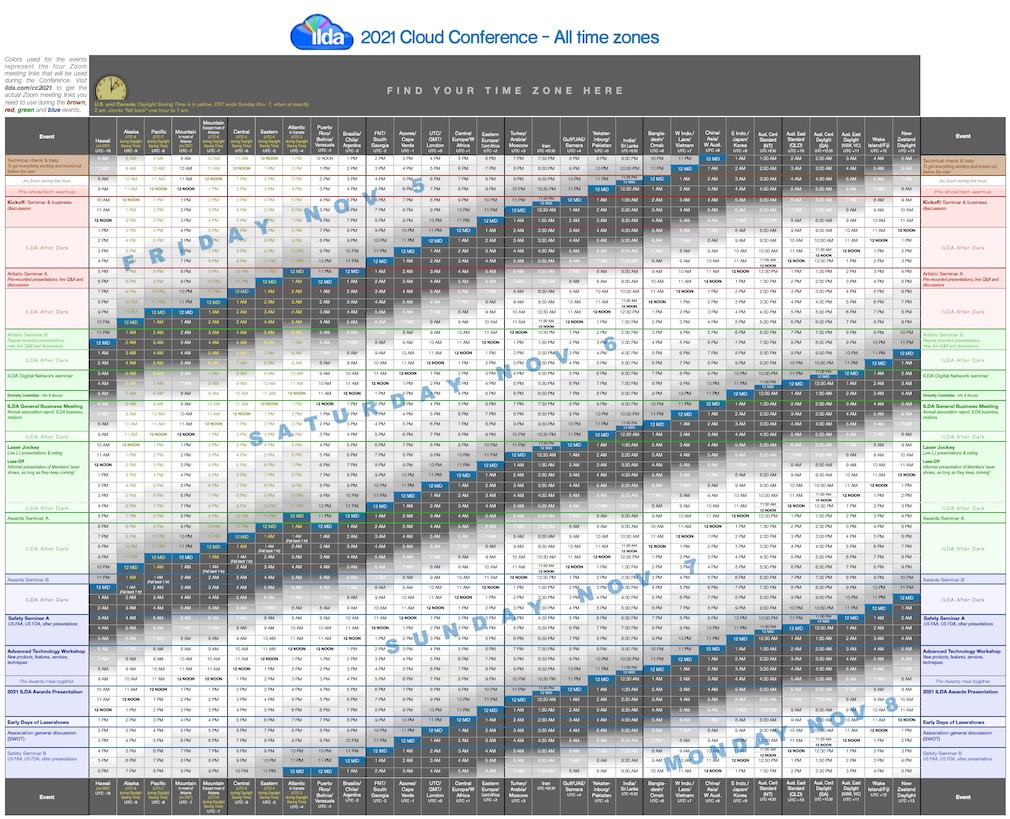
Below are two schedules, one showing when events happen in selected time zones (the most populated), and one showing when events happen in all time zones.
ILDA Conference events are listed in the colored blocks on the left (and right) columns. In the middle are columns which are the time zones. Find your time zone column. You can then look to the left (or right) to find at what time the Conference events will take place in your location. Click on either schedule to see a readable, full-size view.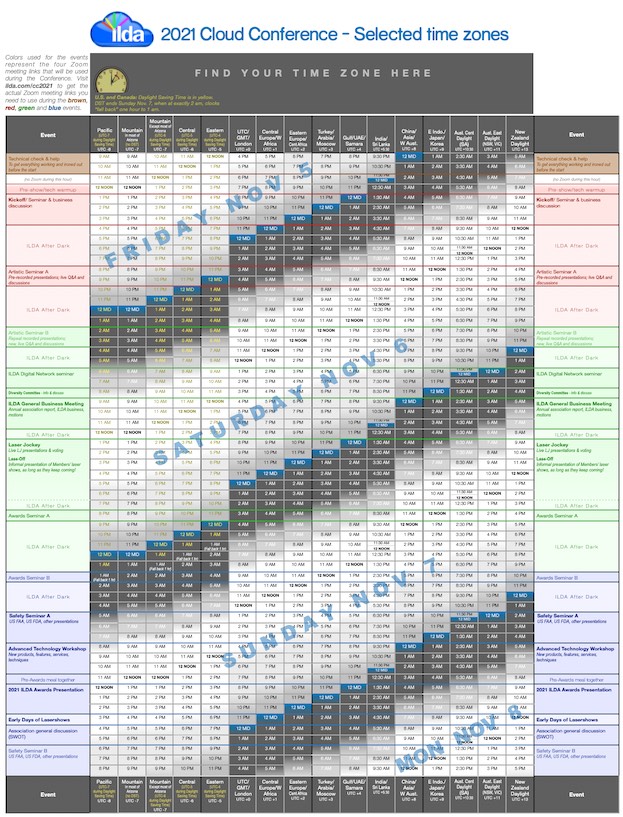
-
Zoom links and list of events
- Below is a list of preliminary Conference events based on last year's Conference. As of August 9 2021, times and topics for the 2021 Cloud Conference are subject to change.
Zoom links
We can't Zoom for 57 hours straight so we have four Zoom links for four different periods. Although the Zoom links are public, only persons registered for the Conference events will be allowed in from the waiting room.
In the list below, the main and first sessions are in bold. Minor or repeated sessions are in regular type.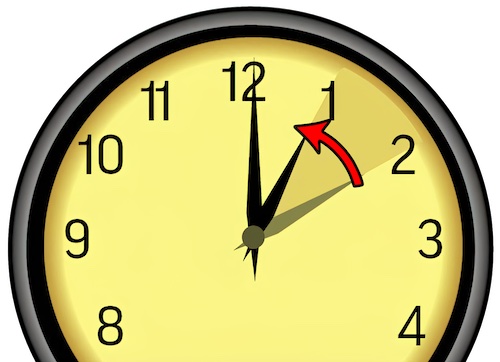
Daylight Saving Time note
U.S. and Canada Members start the Conference during Daylight Saving Time. DST times are shown in yellow. DST ends on Sunday Nov. 7, when at exactly 2 am, clocks "fall back" one hour to 1 am. Regular, non-DST times are shown in black.Between these events
During the down time between the end of one event and the start of the next, the Zoom meeting and HD Streams become "ILDA After Dark." During this time, you can meet old and new friends, and see less formal laser shows, equipment demos and presentations. This will take the place of late-night meetings at the bar, so bring your favorite beverages!About repeated sessions
Some sessions are repeated twice. This makes it easier for people in different time zones to attend. If there are presentations pre-recorded by a presenter, these will be repeated. We then ask the presenter to be available for the Q&A and discussion, if possible, at both sessions. In some cases, we may just re-play a video capture of some or all of the first session, for the second session.Event details
Click on any of the events listed below to open up more information on the event.
Zoom link for technical help session
Begins Friday Nov. 5: Pacific, 9 am. Eastern/NY, 12 noon. UTC/London 4 pm. Central Europe, 5 pm. Moscow, 7 pm. India, 9:30 pm. Saturday, Nov. 6: Sydney, 3 am. Duration: 2 hours.-
Technical check and help session
Begins Friday Nov. 5: Pacific, 9 am. Eastern/NY, 12 noon. UTC/London 4 pm. Central Europe, 5 pm. Moscow, 7 pm. India, 9:30 pm. Saturday, Nov. 6: Sydney, 3 am. Duration: 2 hours. This is the only time this event will occur.
This occurs four hours before the official start of the Cloud Conference (the Kickoff/discussion).
The help session is specifically for people who may want to test their connections, or who have questions about using our tools: Zoom, the HD Stream, and Discord. This is especially designed for novices so there is plenty of time to figure things out.
Zoom link for Conference Part 1
Begins Friday Nov. 5: Pacific, 12 noon. Eastern/NY, 3 pm. UTC/London 7 pm. Central Europe, 8 pm. Moscow, 10 pm. Saturday, Nov. 7: India, 12:30 am. Sydney, 6 am.
Ends Saturday, Nov. 7: Pacific, 2 am. Eastern/NY, 5 am. UTC/London 9 am. Central Europe, 10 am. Moscow, 12 noon. India, 2:30 pm. Sydney, 8 pm.-
Pre-show, warmup
Begins Friday Nov. 5: Pacific, 12 noon. Eastern/NY, 3 pm. UTC/London 7 pm. Central Europe, 8 pm. Moscow, 10 pm. Saturday, Nov. 7: India, 12:30 am. Sydney, 6 am. Duration: 1 hour. This is the only time this event will occur.
This occurs one hour before the official start of the Cloud Conference (the Kickoff/discussion).
This is designed as a warmup to help everyone make sure their connections are working, etc. before the official start.
You do not have to sit through the entire warmup hour if you're confident everything is working. Just tune in 5 or 10 minutes before the start of the Kickoff. -
Kickoff/Business discussion
Begins Friday Nov. 5: Pacific, 1 pm. Eastern/NY, 4 pm. UTC/London 8 pm. Central Europe, 9 pm. Moscow, 11 pm. Saturday, Nov. 6: India, 1:30 am. Sydney, 7 am. Duration: Approx. 2-3 hours depending on depth of the discussion.This is the only time this event will occur.
The Conference begins with a Kickoff event, followed by a seminar and discussions about the current state of laser shows.
-
ILDA Equity, Diversity and Inclusion Committee session A
Times below are offsets from these start times: Friday Nov. 5: Pacific, 7 pm. Eastern/NY, 10 pm. Saturday, Nov. 6: UTC/London 2 am. Central Europe, 3 am. Moscow, 5 am. India, 7:30 am. Sydney, 1 pm. Duration: 1 hour maximum. This session will be repeated 13 hours later.
Activities of the ILDA Equity, Diversity and Inclusion Committee
00:00 Kristin Nelson, EDI chair - Overview -
Artistic Seminar session A
Begins Friday Nov. 5: Pacific, 8 pm. Eastern/NY, 11 pm. Saturday, Nov. 6: UTC/London 3 am. Central Europe, 4 am. Moscow, 6 am. India, 8:30 am. Sydney, 2 pm. Duration: Approximately 2 hours. This seminar will be repeated 6 hours later.
Presentations relating to the art and technique of laser shows. Organized and moderated by Nisha Ramnath.
Zoom link for Conference Part 2
Begins Saturday, Nov. 6: Pacific, 2 am. Eastern/NY, 5 am. UTC/London 9 am. Central Europe, 10 am. Moscow, 12 noon. India, 2:30 pm. Sydney, 8 pm.
Ends Sunday Nov. 7: Pacific, 2 am. Eastern/NY, 5 am. UTC/London, 9 am. Central Europe, 10 am. Moscow, 12 noon. India, 2:30 pm. Sydney, 8 pm.-
Artistic Seminar session B
Begins Saturday, Nov. 6: Pacific, 2 am. Eastern/NY, 5 am. UTC/London 9 am. Central Europe, 10 am. Moscow, 12 noon. India, 2:30 pm. Sydney, 8 pm. Duration: Approximately 2 hours. This is the second and final presentation of this seminar.
Presentations relating to the art and technique of laser shows. Organized and moderated by Nisha Ramnath.
-
ILDA Digital Network Seminar
Begins Saturday, Nov. 6: Pacific, 6 am. Eastern/NY, 9 am. UTC/London 1 pm. Central Europe, 2 pm. Moscow, 4 pm. India, 6:30 pm. Sunday, Nov. 22: Sydney, 12 midnight. Duration: Approximately 2 hours. This is the only time this event will occur.
Updates and demonstrations of the ILDA Digital Network standard. Organized and moderated by Dirk Apitz, Technical Committee chair.
-
ILDA Equity, Diversity and Inclusion Committee session B
Times below are offsets from these start times: Saturday Nov. 6: Pacific, 78am. Eastern/NY, 11 am. UTC/London 3 pm. Central Europe, 4 pm. Moscow, 6 pm. India, 8:30 pm. Sunday Nov. 7: Sydney, 2 am. Duration: 1 hour maximum. This is the second and final presentation of this seminar.
Activities of the ILDA Equity, Diversity and Inclusion Committee
00:00 Kristin Nelson, EDI chair - Overview -
ILDA General Business Meeting
Begins Saturday Nov. 6: Pacific, 9 am. Eastern/NY, 12 noon. UTC/London 4 pm. Central Europe, 5 pm. Moscow, 7 pm. India, 9:30 pm. Sunday Nov. 7: Sydney, 3 am. Duration: 1.5 - 3 hours depending on whether motions and discussions are brought up, and how in-depth they are. This is the only time this event will occur.
The ILDA General Business Meeting is required by the Bylaws. There will be reports on the association plus voting on any motions. This is your chance to help shape the association.
AGENDA
Welcome & opening of meeting
Members introduce themselves
Recognition of Assisting Persons: Newlin Parker and Will Carder, Richard Gonsalves, Brian Gonzalez
Recognition of Safety Software Sponsor: Roberta McHatton
Recognition of ILDA Accredited Professional Members
LaserNet, Laser Spectacles Inc., LOBO
Recognition of past Career Achievement Award recipients attending or expected to attend: Patrick Murphy, 2004; William Benner, 2007; Greg Makhov, 2009; Lothar Bopp, 2010; Tom Harman, 2012; Tim Walsh, 2014; Dr. Alexander Timofeyev, 2016; Alberto Kellner Ongaro, 2019; Christine Jenkin, 2020
Reading of the ILDA Purpose and Code of Ethics
Election of Board of Directors
Two seats up for election in 2021: Brian Gonzalez and Roberta McHatton
Vote by email
Election of President
Any of five Board Members can run for President
Vote by email
Appointment or Election of Secretary
ILDA status report
Membership
Finances
Laser safety courses
Committee Status Reports
Safety – Greg Makhov
Ethics – Roberta McHatton
Technical – Dirk Apitz
Awards – Richard Gonsalves
Regulatory - Brian Gonzalez
Conference – Christine Jenkin
Future Conferences
2022 Conference in London, hosted by ER Productions
2023 Conference in Atlantic Beach, NC with a beachfront laser show, hosted by Emerald Owl Productions
Old Business
Sponsorship and hosting – open to all. Ex: safety software sponsorship
New Business
Adjourn -
Laser Jockey competition
Begins Saturday Nov. 6: Pacific, 1 pm. Eastern/NY, 4 pm. UTC/London 8 pm. Central Europe, 9 pm. Moscow, 11 pm. Sunday Nov. 7: India, 1:30 am. Sydney, 7 am. Duration: About 1.5 hours. This is the only time this event will occur.
Six laserists will play, live, from their laser studio, to music that they have not heard before. This challenging competition tests the ability to make a creative, exciting show on the fly.
After the six laserists have finished, emails will be sent to all Conference registrants so you can rank your favorites. The winner will be announced and awarded tomorrow during the Awards Presentation. -
Lase-Off
Begins Saturday Nov. 6: Pacific, 3 pm. Eastern/NY, 6 pm. UTC/London, 10 pm. Central Europe, 11 pm. Sunday Nov. 7: Moscow, 1 am. India, 3:30 am. Sydney, 9 am. Duration: As long as people can take it. This is the only time this event will occur.
After the Laser Jockey contestants are done, we'll have a "Lase-Off" which is an informal showing of laser shows. Some will be pre-recorded and some will be live from online laser studios. This will go on as long as there are still people interested in presenting.
-
Awards Seminar session A
Begins Saturday Nov. 6: Pacific, 8 pm. Eastern/NY, 11 pm. Sunday Nov. 7: UTC/London, 3 am. Central Europe, 4 am. Moscow, 6 am. India, 8:30 am. Sydney, 2 pm. Duration: 1 hour maximum. This seminar will be repeated 6 hours later.
See if you can "beat the judges" by ranking excerpts from laser shows entered in the 2021 ILDA Awards. Will you come close or match the judges' selections in a category?
Also, a discussion of proposed changes to the ILDA Awards for 2022. Organized and presented by Patrick Murphy.
Zoom link for Conference Part 3
Begins Sunday Nov. 7: Pacific, 2 am Daylight Saving Time which immediately becomes 1 am regular time. Eastern/NY, 4 am. UTC/London, 9 am. Central Europe, 10 am. Moscow, 12 noon. India, 2:30 pm. Sydney, 8 pm.
Conference ends Sunday, Nov. 7: Pacific 9 pm, Monday Nov. 8: Eastern/NY, 12 midnight. UTC/London, 5 am. Central Europe, 6 am. Moscow, 8 am. India, 10:30 am. Sydney, 4 pm.-
Awards Seminar session B
Begins Sunday Nov. 7: Pacific, 2 am Daylight Saving Time which immediately becomes 1 am regular time. Eastern/NY, 4 am. UTC/London, 9 am. Central Europe, 10 am. Moscow, 12 noon. India, 2:30 pm. Sydney, 8 pm. Duration: 1 hour maximum. This is the second and final presentation of this seminar.
See if you can "beat the judges" by ranking excerpts from laser shows entered in the 2021 ILDA Awards. Will you come close or match the judges' selections in a category?
Also, a discussion of proposed changes to the ILDA Awards for 2022. Organized and presented by Patrick Murphy. -
Safety Seminar session A
Begins Sunday Nov. 7: Pacific, 5 am. Eastern/NY, 8 am. UTC/London, 1 pm. Central Europe, 2 pm. Moscow, 4 pm. India, 6:30 pm. Sydney, 11:59 pm. Duration: Approximately 2.5 hours. This presentation will be repeated 14 hours later.
An overview of safety regulations and culture. Although some presenters are U.S.-specific, the concepts they discuss may be applicable to laser safety worldwide.
We expect to have presenters from U.S. Food and Drug Administration and the U.S. Federal Aviation Administration. -
Advanced Technology Workshop
Begins Sunday Nov. 7: Pacific, 8 am. Eastern/NY, 11 am. UTC/London, 4 pm. Central Europe, 5 pm. Moscow, 7 pm. India, 9:30 pm. Monday, Nov. 8: Sydney, 3 am. Duration: 3 hours, maybe slightly longer. This is the only time this event will occur.
Presentations of new devices, hardware, software and services. Organized and presented by Dirk Apitz.
00:00 Dirk Apitz, ILDA Technical Committee chair, Introduction
Topics will include:
PROJECTORS AND COMPONENTS
SOFTWARE
IDN (ILDA DIGITAL NETWORK)
MULTIMEDIA
Q&A/DISCUSSION
General Q&A/Discussion -
2021 ILDA Awards Presentation
Begins Sunday Nov. 7 Pacific, 12 noon. Eastern/NY, 3 pm. UTC/London, 8 pm. Central Europe, 9 pm. Moscow, 11 pm. Monday, Nov. 8: India, 1:30 am. Sydney, 7 am. Duration: Approximately 1.5 - 2 hours. This is the only time this event will occur.
The highlight of the final day is the 2021 ILDA Awards. Categories include Artistic, Technical, Career Achievement and Special Achievement. You'll get to see the winning entries and hear from the award recipients.
In keeping with our traditional formal dinner, please wear a suit, tuxedo or evening wear while you are on the Zoom (at least on the parts we can see on camera!). This is a special event and we want to look special.
Award winners who were not able to make a video acceptance speech in advance may be able to do so live, after all winning entries in their category are shown. All acceptance speeches are limited to 45 seconds maximum.Order of the Awards
LASER JOCKEY
Announcement of the Laser Jockey winners
TECHNICAL CATEGORIES
Fenning Award for Technical Achievement, ILDA Digital Network category
Fenning Awards for Technical Achievement, General category
ARTISTIC CATEGORIES
Laser Photography
Permanent Installation
Innovative and Fine Art
Planetarium Show
(break)
Corporate Show
Live TV Show
Edited Film/TV/Video
Laser Show with Added Effects/Multimedia
Nightclub/Disco/Music Festival Show
Live Stage Show
Multi-Effect Laser Show
Graphics Show
Abstract Show
Beams/Atmospherics Show for a Single X-Y Scanner Pair
Beams/Atmospherics Show with Outboard Effects
Beams/Atmospherics Show for Multiple-Scanner Projectors
ACHIEVEMENT
Career Achievement Award -
Association general discussion/SWOT
Begins Sunday Nov. 7: Pacific, 4 pm. Eastern/NY, 7 pm. Monday, Nov. 8: UTC/London, 12 midnight. Central Europe, 1 am. Moscow, 3 am. India, 5:30 am. Sydney, 11 am. Duration: 2 hours maximum. This is the only time this event will occur.
Discussion about ILDA: Suggestions, improvements, SWOT analysis (Strength, Weakness, Opportunity and Threat). Organized and presented by Brian Gonzalez, ILDA President.
-
Safety Seminar session B
Begins Sunday Nov. 7: Pacific, 6 pm. Eastern/NY, 9 pm. Monday, Nov. 8: UTC/London, 2 am. Central Europe, 3 am. Moscow, 5 am. India, 7:30 am. Sydney, 1 pm. Duration: Approximately 2.5 hours This is the second and final presentation of this seminar, and the final event of the 2020 ILDA Cloud Conference.
An overview of safety regulations and culture. Although some presenters are U.S.-specific, the concepts they discuss may be applicable to laser safety worldwide.
We expect to have presenters from U.S. Food and Drug Administration and the U.S. Federal Aviation Administration.
-
Technical check and help session
Countdown to the Cloud Conference start
The first timer below shows how long until the first official Cloud Conference event, the Kickoff/discussion.
It begins Friday Nov. 5 at: 1 pm Pacific, 4 pm Eastern/NY, 8 pm UTC/London, 9 pm Central Europe, 11 pm Moscow, and on Saturday, Nov. 6 at 1:30 am India, 7 am Sydney.
Prior to the first official event are two "tech" events:
— Four hours before is a technical help session. It lasts 2 hours (12 noon - 2 pm Eastern/NY). This help session is specifically for people who may want to test their connections, or who have questions about using our tools: Zoom, the HD Stream, and Discord. This is especially designed for novices so there is plenty of time to figure things out.
— One hour before is a warm-up, get-ready session. It is similar to the above: getting ready and making sure everything is working.
Countdown to the Cloud Conference end
For more information, visit our other ILDA websites:
© 2007-2026 International Laser Display Association. All rights reserved.
Contact ILDA
No reproduction of the text or images on ILDA websites is allowed without written permission of ILDA or other copyright holders. "ILDA" and the ILDA logo are trademarks of the International Laser Display Association.
This site does not use cookies and does not track or gather information on individual visitors. Aggregate information is gathered by Google Analytics to determine overall visitor behavior. More information is on our Privacy Policy page.